Roblox Shirt Template (585×559): Sizes and Every Panel Explained
Every measurement of the Roblox Classic Shirt template (585×559 px): torso, sides, sleeves and where each panel shows up on the avatar. Free template download included.
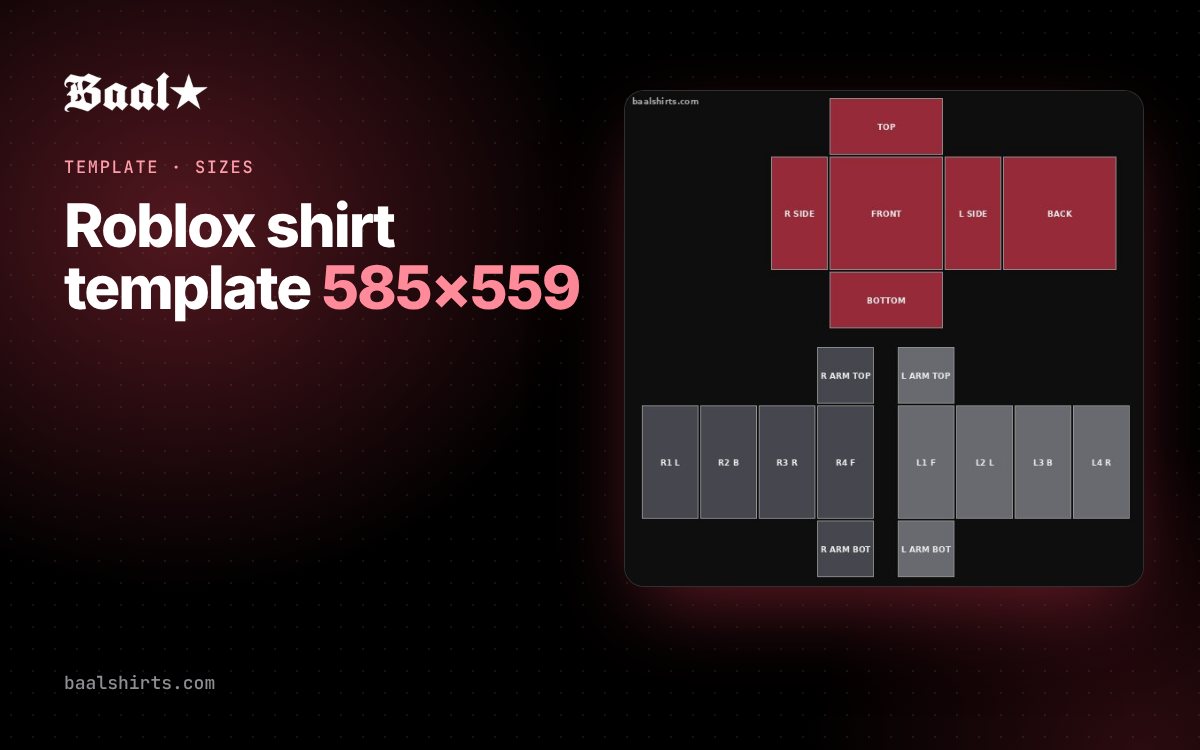
If you’ve ever uploaded a shirt to Roblox and the logo ended up on the shoulder or cut in half on the back, the template is almost always the culprit. Here are all the Classic Shirt template measurements and where each panel shows up on the avatar.
Free download: the Resources page has the 585×559 template with color-coded panels, plus an outline-only version to draw on top of.
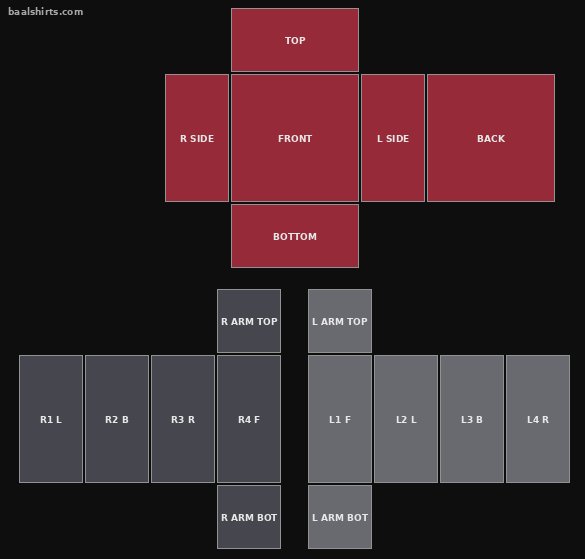
The key size: 585×559 pixels
The image you upload as a classic shirt must be exactly 585 px wide by 559 px tall. Roblox takes fixed regions of that image and applies them to each face of the torso and arms. If the image is a different size, the regions shift and the design comes out crooked.
Torso panels
The torso is a block with six faces. On the template they sit at the top, in a cross shape:
| Panel | Position (x, y) | Size | Where it shows |
|---|---|---|---|
| FRONT | 231, 74 | 128×128 | Chest |
| BACK | 427, 74 | 128×128 | Back |
| R SIDE | 165, 74 | 64×128 | Avatar’s right side |
| L SIDE | 361, 74 | 64×128 | Avatar’s left side |
| TOP | 231, 8 | 128×64 | Shoulders (top) |
| BOTTOM | 231, 204 | 128×64 | Bottom of the torso |
Coordinates are the top-left corner of each panel, measured from the top-left corner of the image.
Tip: front and back are the most visible panels. If you’re only placing a logo, center it on FRONT and keep a 6–8 pixel margin from the edges.
Arm panels
Each arm is a long block with four side faces, plus the top (shoulder) and bottom (hand):
| Panel | Position (x, y) | Size | Face |
|---|---|---|---|
| R1 · L | 19, 355 | 64×128 | Right arm, left face |
| R2 · B | 85, 355 | 64×128 | Right arm, back |
| R3 · R | 151, 355 | 64×128 | Right arm, right face |
| R4 · F | 217, 355 | 64×128 | Right arm, front |
| R ARM TOP | 217, 289 | 64×64 | Right shoulder |
| R ARM BOTTOM | 217, 485 | 64×64 | Right hand |
| L1 · F | 308, 355 | 64×128 | Left arm, front |
| L2 · L | 374, 355 | 64×128 | Left arm, left face |
| L3 · B | 440, 355 | 64×128 | Left arm, back |
| L4 · R | 506, 355 | 64×128 | Left arm, right face |
| L ARM TOP | 308, 289 | 64×64 | Left shoulder |
| L ARM BOTTOM | 308, 485 | 64×64 | Left hand |
“Right” and “left” are from the avatar’s point of view, not the viewer’s. This is the most common mix-up: the avatar’s right arm appears on the left of your screen when you look at it from the front.
Short vs. long sleeves
A short-sleeve shirt only paints the top part of the arm faces and leaves the rest transparent so the avatar’s skin shows. A long-sleeve shirt covers the whole face. Anything you leave transparent will always show the avatar’s body.
How to use the template the easy way
You have two options:
- Draw on the template in Photoshop, Photopea, Procreate or Krita, using the outline template as a guide layer, and export a 585×559 PNG.
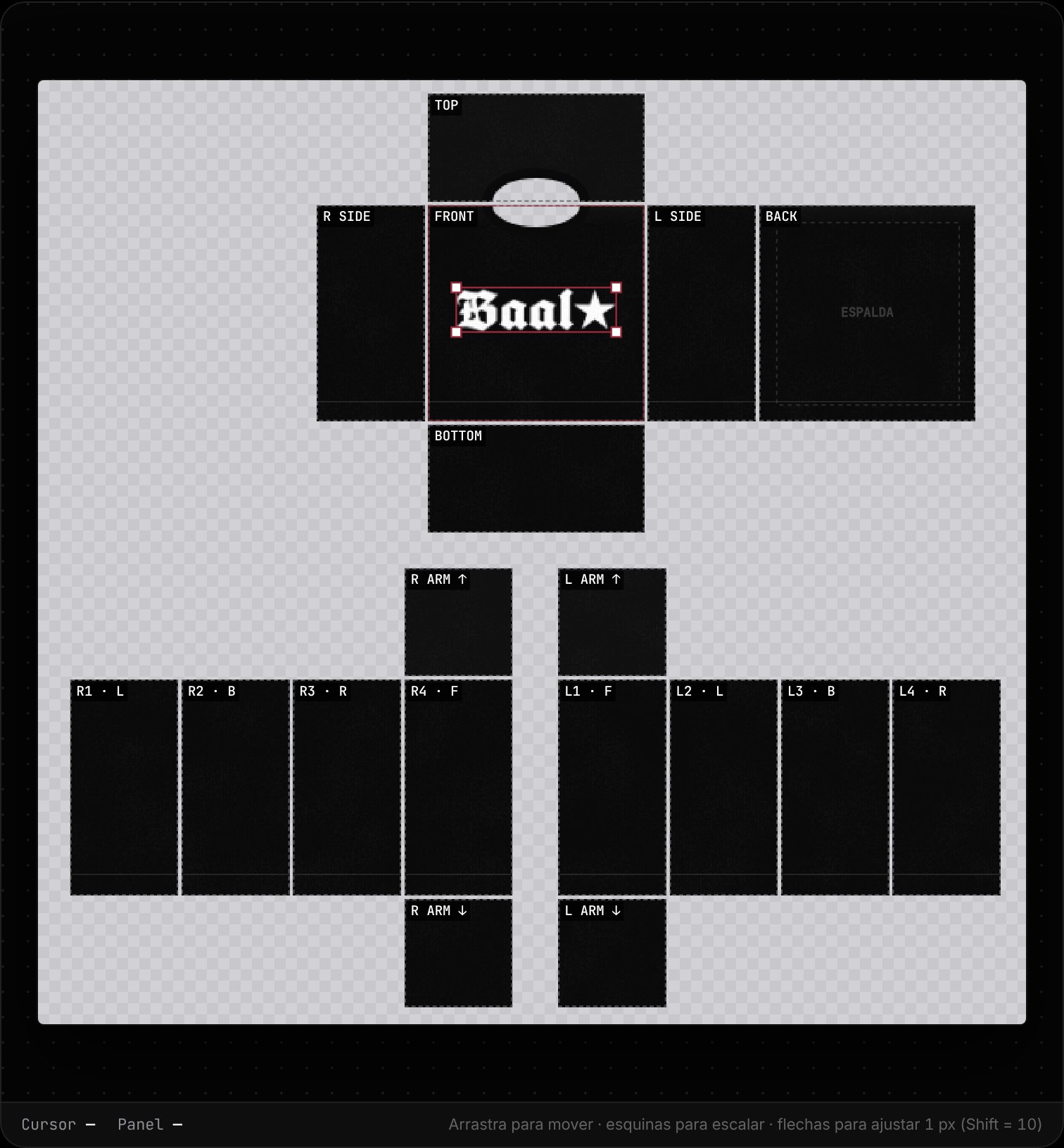
- Use an editor that already knows the panels, like Baal Shirt Studio: pick the area (front, back, sleeve), upload your graphic and the editor places and clips it inside its region. You also see the result on a 3D avatar before uploading.
Common template mistakes
- Resizing the canvas. If your app exports at 600×600 or crops the image, the panels no longer line up.
- Mixing up the arms. Check the table: R is the avatar’s right arm.
- Leaving guides visible. If you draw over the color template, hide that layer before exporting.
- Graphics crossing panels. A logo that runs from the front onto the side will look split on the avatar, because they’re different faces.
Next step
With the sizes clear, the next step is to make your shirt step by step or, if it’s ready, upload it to Roblox.
FAQ
What size is the Roblox shirt template?
The Classic Shirt template is 585 pixels wide by 559 pixels tall. If you upload an image of a different size, the panels won’t line up with the avatar’s body.
What happens with the transparent parts of the template?
Wherever the template is transparent, the avatar’s body shows through. That’s why a short-sleeve shirt leaves the lower part of the arms transparent.
Can I use the same template for pants?
Classic pants use a template of the same size and a similar layout, but the torso areas map to the hips and legs. This guide focuses on shirts.